
Google Tasks doesn’t have to be complicated, sometimes the simplest tools are the most effective.

Google Tasks is a lightweight task management app designed to help users organize daily to-dos quickly and efficiently. It focuses on simplicity, allowing you to capture tasks, structure them into lists, and stay on top of your responsibilities without unnecessary features.
In a world filled with complex productivity platforms, simple tools like Google Tasks stand out by reducing friction. They help users stay focused, avoid overwhelm, and maintain consistent productivity habits without needing to learn advanced systems.
Google Tasks Overview
What is Google Tasks?
Google Tasks is a streamlined task management application developed by Google LLC. It allows users to create to-do lists, organize tasks, set deadlines, and track progress in a simple and intuitive environment. Unlike full-scale project management tools, it is designed for quick interactions and everyday productivity.
Core Purpose
The core purpose of Google Tasks is to provide a clean and distraction-free space where users can organize their responsibilities. It focuses on helping users capture tasks quickly, structure them logically, and complete them efficiently without being slowed down by unnecessary features or visual clutter.
Who It’s For
Google Tasks is ideal for individuals who want a straightforward way to manage their responsibilities. This includes students organizing assignments, professionals tracking daily work, and anyone who prefers a minimalist approach to productivity rather than complex systems with steep learning curves.
Primary Use Case
The app is primarily used for managing daily to-do lists, tracking small projects, and keeping tasks organized across multiple devices. It works especially well for short-term planning, reminders, and maintaining a clear overview of what needs to be done next.
Google Tasks Key Features
Task List Creation
Users can create multiple lists to separate different areas of their life, such as work, personal tasks, or study goals. This makes it easier to stay organized and avoid mixing unrelated responsibilities in a single list.
Subtasks
Subtasks allow users to break down larger or more complex tasks into smaller, actionable steps. This not only makes tasks feel more manageable but also helps track progress more effectively.
Due Dates & Notifications
Google Tasks allows users to assign due dates to tasks and receive notifications. This ensures that important deadlines are not missed and helps maintain a consistent workflow.
Drag and Drop Prioritization
Tasks can be easily reordered using simple drag-and-drop gestures. This makes it quick to adjust priorities as circumstances change throughout the day.
Starred Tasks
Users can mark important tasks with a star to highlight priorities. This feature acts as a quick filter for focusing on the most critical items without scanning entire lists.
Gmail Integration
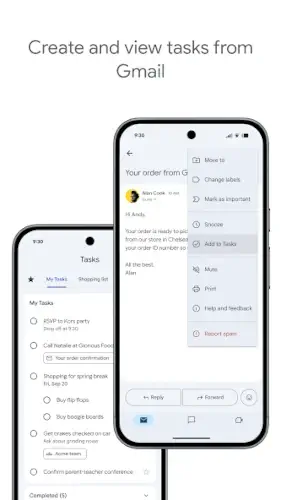
One of the most powerful features is its integration with Gmail. Users can convert emails into tasks directly, keeping a link back to the original message. This is especially useful for managing follow-ups and action items from communication.
Google Calendar Integration
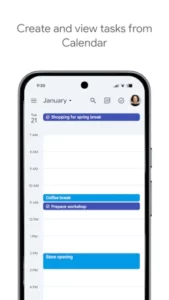
Integration with Google Calendar allows tasks with due dates to appear alongside scheduled events. This creates a more complete view of time management and helps users balance tasks with appointments.
Mobile Access
Google Tasks is available across devices, allowing users to access and update their lists anytime. Whether on a smartphone, tablet, or desktop, tasks stay synchronized in real time.
How Google Tasks Works
Basic Workflow
The workflow is intentionally simple: create a task, organize it into a list, assign a due date if needed, complete it, and repeat. This straightforward process reduces friction and encourages consistent use.
Productivity Loop
The core productivity loop, capture → prioritize → execute → check off—helps users stay focused on action. By quickly capturing tasks and completing them, users build momentum and maintain productivity throughout the day.
User Interaction
Interaction with the app is minimal and efficient. Tasks can be added in seconds, rearranged easily, and marked complete with a single tap. This low effort interaction model makes it ideal for quick updates and daily use.
Integration Flow
Google Tasks integrates seamlessly with Gmail and Calendar, creating a connected productivity system. Emails can become tasks, and tasks can appear in your schedule, ensuring that nothing falls through the cracks.
Google Tasks Graphics and Design
Minimal Interface
The interface of Google Tasks is intentionally minimal. It focuses on lists, task names, and checkboxes, eliminating distractions and keeping attention on what matters most, getting things done.
Simple Navigation
Navigation is straightforward, with clear access to task lists, subtasks, and settings. Users can switch between lists and manage tasks without confusion or extra steps.
Design Philosophy
The design prioritizes speed, clarity, and usability. Instead of offering complex visual elements, it ensures that every feature is easy to find and quick to use. This aligns with the app’s goal of reducing cognitive load.
User Experience
The overall experience is fast, clean, and beginner friendly. Even users with no prior experience in task management apps can start using it immediately without needing tutorials or setup time.
Google Tasks User Reviews and Feedback
Positive Feedback
Users consistently praise Google Tasks for its simplicity and seamless integration with other Google services. Many appreciate how quickly they can capture and manage tasks without navigating complex interfaces.
Popular Use Cases
Common use cases include managing daily to-do lists, tracking reminders, organizing small projects, and handling email follow-ups. Its simplicity makes it especially effective for everyday productivity rather than long term planning.
Criticism
The most common criticism is its lack of advanced features. Users who need project management tools, team collaboration, or automation workflows may find it too basic. Features like Kanban boards, tagging systems, or analytics are not included.
Overall Reputation
Overall, Google Tasks is widely regarded as a dependable, no-frills productivity tool. It excels in simplicity and ease of use, making it a strong choice for users who value clarity and efficiency over feature complexity.
Google Tasks Practical Use Cases
Daily Task Management
Google Tasks is ideal for managing everyday responsibilities such as errands, reminders, and short-term goals. Its simplicity allows users to quickly capture tasks and check them off, making it perfect for maintaining daily productivity without friction.
Personal Productivity Tracking
The app helps users stay accountable by providing a clear overview of pending and completed tasks. By regularly updating and reviewing lists, users can build consistent habits and maintain focus on what matters most.
Email Follow-Up Organization
Thanks to integration with Gmail, users can turn emails into actionable tasks. This is especially useful for managing follow-ups, ensuring that important messages don’t get lost in the inbox.
Simple Work Planning
For lightweight work planning, Google Tasks allows users to organize assignments, prioritize responsibilities, and break down projects into manageable steps, without the complexity of full project management tools.
Google Tasks Tips and Tricks
Use Multiple Lists for Better Organization
Create separate lists for work, personal tasks, or study to keep everything structured and easy to navigate.
Break Tasks into Subtasks
Use subtasks to divide larger goals into smaller steps, making them easier to complete and track.
Prioritize with Starring and Reordering
Mark important tasks with a star and move them to the top of your list so you always focus on high-priority items first.
Turn Emails into Actionable Tasks
Convert emails into tasks directly from Gmail, keeping a link to the original message for quick reference.
Sync with Calendar for Better Visibility
When connected with Google Calendar, tasks with due dates appear alongside events, helping you plan your time more effectively.
Keep Tasks Short and Actionable
Use clear, concise task titles so you can quickly understand what needs to be done without overthinking.
Review Tasks Daily
Regularly checking your task lists helps prevent buildup and keeps your workflow organized and up to date.
Google Tasks Similar Apps
Todoist
A popular task manager with advanced features like labels, filters, and productivity tracking, suitable for both personal and professional use.
Microsoft To Do
A clean and user friendly app focused on daily planning, reminders, and integration with Microsoft services.
TickTick
A feature rich tool that includes calendars, habit tracking, and advanced scheduling options.
Any.do
A lightweight productivity app that combines tasks, reminders, and calendar features in a simple interface.
Notion
A flexible all in one workspace that combines tasks, notes, and databases, offering more customization but with added complexity.
Conclusion
Google Tasks is a simple yet highly effective task manager built for everyday use and quick organization.
Its biggest strengths are ease of use, fast and intuitive workflow, and seamless integration with the Google ecosystem.
For users who value clarity over complexity, Google Tasks proves that productivity doesn’t require powerful systems, just the right tool used consistently.
FAQ (Frequently Asked Questions)
What is Google Tasks and what does it do?
Google Tasks is a simple to-do list app that helps you organize tasks, set due dates, create subtasks, and manage daily responsibilities in a clean interface.
Is Google Tasks free to use?
Yes, Google Tasks is completely free and included with your Google account, making it easily accessible without any subscription or extra cost.
Where can I get Google Tasks download?
You can access the Google Tasks download here:
- Official Google Play Store: https://play.google.com/store/apps/details?id=com.google.android.apps.tasks
- Official Page: https://workspace.google.com/products/tasks/
Does Google Tasks work with other Google apps?
Yes, it integrates seamlessly with Gmail and Google Calendar, allowing you to turn emails into tasks and view deadlines alongside events.
Is Google Tasks good for project management?
Google Tasks is best for simple task management. While it works well for daily to-dos and small projects, it may feel limited for complex project planning or team collaboration.