
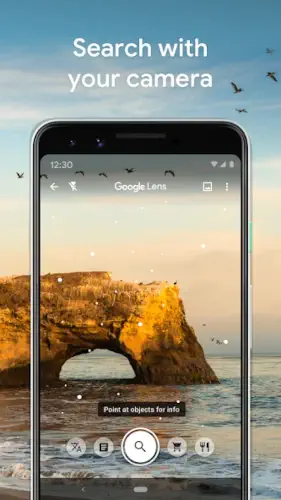
Google Lens: turning your smartphone into a real time search engine that doesn’t need words, just vision. No typing, no guessing, just aim, scan, and understand.

Google Lens is an AI powered tool that bridges the gap between the physical and digital worlds. Whether you’re translating a menu in a foreign country, identifying a plant on your morning walk, or copying notes from a whiteboard, it compresses friction into a single tap. In an era where speed matters, Lens feels less like an app and more like a shortcut to clarity.
And its role is only growing. As AI continues to reshape how we search, Google Lens sits at the forefront of a shift toward visual intelligence, where what you see becomes what you know, instantly.
Overview of Google Lens
- What is Google Lens?
Google Lens is an AI powered visual search tool developed by Google LLC that allows users to identify, explore, and interact with the world using their camera, images, or screenshots. It transforms visual input into actionable information in seconds. - Core Purpose
The mission is simple but powerful: make the real world searchable. Instead of typing queries, users can point their camera at objects, text, or scenes and receive relevant results instantly. It’s search, reimagined through vision. - Everyday Use Cases
Google Lens thrives in everyday moments. Travelers use it to decode foreign signs, shoppers scan products to compare prices, students extract text from books, and curious minds use it to identify anything from landmarks to insects. It removes the barrier between curiosity and answers.
Google Lens Key Features:
- Text Recognition
Extract text directly from images or screenshots and copy it instantly, perfect for notes, documents, or anything you don’t feel like retyping. - Instant Translation
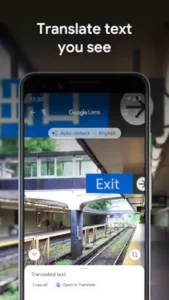
Translate menus, street signs, or documents in real time, overlaying the translated text seamlessly onto the original image. - Product Search
See something you like? Scan it. Google Lens finds similar items, price comparisons, and shopping links within seconds. - Object & Plant Identification
From plants and pets to random objects, Lens identifies what’s in front of you and provides useful context or information. - QR & Barcode Scanning
Quickly scan codes to open links, view product details, or access digital content without needing a separate app. - Search by Image
Upload or snap a photo and ask questions about it, Lens delivers contextual results based on what it “sees.” - Travel & Landmark Recognition
Point your camera at a building or landmark and instantly uncover its name, history, and nearby attractions.
How Google Lens Works
- Basic Workflow
Open Google Lens, point your camera or upload an image, and let the AI analyze it. Within seconds, relevant results and actions appear, ready to use. - Interactive Experience
It’s not just about results, it’s about interaction. Users can refine searches, ask follow-up questions, or choose from multiple suggested actions like translating, copying, or shopping. - AI Integration
Behind the scenes, advanced machine learning models process visual data, recognize patterns, and connect them to Google’s vast database, delivering accurate and context-aware results.
Google Lens Graphics and Design
- Camera-First Interface
Google Lens is built around the camera, keeping the experience direct and intuitive. No clutter, just point and go. - Minimalist Layout
Clean lines, simple controls, and clear result cards make navigation effortless, even for first-time users. - User Experience
Speed is everything. Lens delivers fast scans, immediate feedback, and smooth transitions between actions, making the entire experience feel seamless. - Consistency with Google Ecosystem
The design mirrors Google’s broader aesthetic, familiar, lightweight, and functional, so it integrates naturally with tools like Search, Maps, and Photos.
Google Lens User Reviews and Feedback
- Positive Feedback
Users consistently praise Google Lens for its speed, accuracy, and everyday usefulness. It’s seen as a practical tool that simplifies real world tasks instantly. - Popular Use Cases
Translation, shopping comparisons, and object identification dominate user behavior, highlighting how Lens fits into daily routines. - Common Drawbacks
Like most AI tools, it performs best with a stable internet connection. In low light conditions or with complex images, occasional misidentifications can occur. - Overall Reputation
Despite minor limitations, Google Lens holds a strong reputation as a reliable, efficient, and genuinely useful tool, one that solves real problems with minimal effort.
Google Lens Practical Use Cases
- Travel
Lost in translation? Not anymore. With Google Lens, street signs, menus, and public notices become instantly readable. Point your camera at a landmark, and within seconds, you’ll know where you are, what you’re looking at, and what’s nearby. It’s like carrying a local guide in your pocket, minus the awkward small talk. - Shopping
See it. Scan it. Buy it, smarter. Google Lens transforms window shopping into instant research, pulling up product matches, price comparisons, and buying options in real time. Whether it’s sneakers on the street or furniture in a café, the gap between desire and decision shrinks dramatically. - Education
From lecture notes to textbook paragraphs, Lens makes learning frictionless. Snap a photo, extract the text, and dive deeper with quick searches. It’s a quiet ally for students., helping with research, quick answers, and capturing information without breaking focus. - Daily Life
Beyond the obvious, Google Lens thrives in the small moments: identifying a plant in your living room, scanning a QR code at a restaurant, or decoding a label you don’t recognize. It’s less about “big features” and more about making everyday interactions smoother, faster, and smarter.
Google Lens Tips and Tricks
- Use Clear, Well Lit Images
Better lighting equals better results. Crisp visuals help the AI recognize objects with higher accuracy. - Scan Screenshots
Don’t limit yourself to live camera use, screenshots are just as powerful for extracting text or identifying content. - Leverage Translation While Traveling
Menus, signs, instructions, Lens turns language barriers into minor inconveniences instead of major obstacles. - Scan Before You Buy
Quickly compare products, read reviews, and explore alternatives before making a purchase decision. - Ask Follow-Up Questions
Lens isn’t a one shot tool. Refine your search, dig deeper, and treat it like a conversation with what you’re seeing.
Google Lens Similar Apps
While Google Lens leads the pack, it’s not alone in the visual search space. Several apps offer overlapping features, each with its own angle.
- Circle to Search
Focuses on identifying on screen content quickly, especially within mobile interfaces. - Microsoft Lens
Strong in document scanning and text extraction, often used in professional or academic settings. - Google Photos
Integrates visual recognition within your image library, allowing you to search and organize photos intelligently. - Apple Visual Look Up
Built into Apple’s ecosystem, offering object and landmark recognition directly within photos. - Pinterest Lens
Designed for discovery and inspiration, particularly in fashion, design, and lifestyle.
What Makes Google Lens Stand Out
It’s the balance. Google Lens doesn’t just specialize, it generalizes exceptionally well. From translation to shopping to identification, all backed by Google’s search engine and AI infrastructure, it feels less like a feature and more like a universal tool.
Conclusion
Google Lens it’s a shift in how we interact with the world. By turning your camera into a gateway for information, it eliminates the need to describe what you see and replaces it with instant understanding.
Its real power lies in simplicity. No learning curve, no complexity, just point, scan, and know. Whether you’re traveling, studying, shopping, or simply curious, it removes friction from everyday moments.
And that’s the bigger picture: search is no longer just something you type. With tools like Google Lens, it’s something you see. Fast, intuitive, and powered by AI, this is what the future of search looks like.

FAQ
What is Google Lens and how does it work?
Google Lens is an AI powered visual search tool that lets you use your camera or images to identify objects, translate text, and get instant information. Just point, scan, and interact with what you see, no typing needed.
Where can I do a Google Lens download?
Download Google Lens through the official Google Play Store
Is Google Lens free to use?
Yes, Google Lens is completely free. There are no subscription fees, and it’s often built directly into apps like Google Photos, Google Search, and Android cameras.
What are the best ways to use Google Lens in daily life?
Google Lens is perfect for translating text while traveling, scanning products for price comparison, copying notes, identifying plants or objects, and even exploring landmarks instantly.
Where can I learn more about Google Lens or get help?
Here are some useful resources:
- Wikipedia: https://en.wikipedia.org/wiki/Google_Lens
- Google Help Forum: https://support.google.com/
- Product Community Reviews: https://www.producthunt.com/products/google-lens/reviews
These platforms offer guides, updates, and community driven tips.