
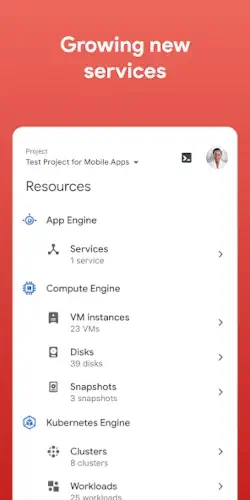
Google Cloud is no longer reserved for large tech companies with massive infrastructure budgets, as it now powers everything from small mobile apps to complex global business systems that require reliability, speed, and scalability.

Google Cloud is providing a powerful environment where developers and organizations can build, deploy, and manage applications without needing to own or maintain physical servers.
Google Cloud is a comprehensive cloud computing platform developed by Google LLC that delivers a wide range of services including computing power, storage, networking, databases, and advanced technologies like artificial intelligence and machine learning. Instead of relying on local hardware, users can access these resources through the internet, making it possible to scale projects quickly and efficiently.
This matters because modern applications and businesses demand flexibility, speed, and the ability to grow without limitations. Google Cloud enables this by removing the complexity of managing infrastructure, allowing teams to focus on building products, analyzing data, and delivering value while the platform handles performance, reliability, and scaling behind the scenes.
Overview of Google Cloud
What is Google Cloud?
Google Cloud is a cloud computing platform developed by Google LLC that provides on-demand access to computing resources, storage systems, and advanced services through a global network of data centers.
Core Purpose
The primary purpose of Google Cloud is to enable users to run applications, store and process data, and scale services dynamically without the need to manage physical hardware or traditional server infrastructure. This allows businesses and developers to focus on innovation rather than maintenance and operational complexity.
Who It’s For
Google Cloud is designed for a broad audience that includes individual developers building applications, startups looking for scalable infrastructure, enterprises managing complex systems, IT teams responsible for deployment and operations, and data-driven organizations that rely on analytics and machine learning to gain insights.
Primary Use Case
The platform is primarily used for hosting applications, managing and analyzing large volumes of data, and building scalable systems that can adapt to changing demand, making it a foundational tool for modern software development and digital services.
Google Cloud Key Features
Global Infrastructure (Regions and Zones)
Google Cloud operates on a global network of data centers organized into regions and zones, which allows users to deploy applications closer to their users for lower latency while also improving reliability through redundancy and failover capabilities.
Compute Services (Virtual Machines, App Engine)
The platform offers multiple compute options, including virtual machines for full control over environments and managed services like App Engine that simplify deployment by handling infrastructure automatically.
Storage & Databases
Google Cloud provides a variety of storage solutions for files, backups, and structured data, along with managed databases that support different workloads, from simple applications to large scale enterprise systems.
Networking Tools (VPC, Load Balancing, CDN)
Advanced networking features such as Virtual Private Cloud (VPC), load balancing, and content delivery networks ensure secure, fast, and efficient communication between services and users across the globe.
AI & Machine Learning Services
The platform includes powerful AI and machine learning tools that allow developers to build intelligent applications, analyze large datasets, and automate processes using advanced algorithms and models.
Pay as You Go Pricing
Google Cloud uses a flexible pricing model where users only pay for the resources they consume, which helps control costs and makes it easier to scale services without large upfront investments.
Managed Services
Many services are fully managed by Google, reducing the need for manual setup, maintenance, and updates, which allows teams to focus more on development and less on infrastructure management.
Security & Compliance Features
Google Cloud integrates strong security measures and compliance standards, including encryption, identity management, and access controls, ensuring that data and applications remain protected in a shared cloud environment.
How Google Cloud Works
Basic Workflow
The typical workflow begins with selecting a service that matches a specific need, configuring the necessary settings, deploying the application or workload, monitoring its performance, and scaling resources as demand increases or decreases.
Deployment Model
Infrastructure as a Service (IaaS)
This model provides virtualized computing resources such as virtual machines and storage, giving users full control over their environment while still benefiting from cloud infrastructure.
Platform as a Service (PaaS)
PaaS simplifies development by providing a managed environment where developers can build and deploy applications without worrying about underlying infrastructure or system administration.
Serverless Computing
Serverless services allow users to run code without managing servers at all, automatically scaling based on usage and charging only for the actual execution time of applications.
Resource Management
Resources within Google Cloud are organized into projects, where users can manage services, permissions, and configurations through a web-based console or programmatically using APIs and command-line tools.
Operational Loop
The ongoing process within Google Cloud typically follows a continuous cycle of building applications, deploying them to the cloud, monitoring performance and usage, and optimizing both performance and cost over time.
Google Cloud Graphics and Design
Interface Style
Google Cloud uses a dashboard-based interface that presents services, metrics, and configurations in a structured and data-driven way, focusing on functionality rather than visual aesthetics.
Navigation Structure
The platform relies on a menu driven layout where users can access different services, manage resources, and monitor activity through clearly organized sections and panels.
Design Philosophy
The design prioritizes control, flexibility, and access to detailed configuration options, which is essential for managing complex cloud environments even if it introduces a higher level of complexity.
User Experience
While the interface is powerful and capable of handling advanced workflows, it can feel overwhelming for beginners due to the number of available options, settings, and technical terminology involved.
Google Cloud User Reviews and Feedback
Positive Feedback
Users frequently highlight Google Cloud as a powerful and scalable platform that offers a wide range of features, making it suitable for everything from small projects to large enterprise systems.
Popular Use Cases
Common use cases include hosting web applications, running data analytics pipelines, building machine learning models, and managing large-scale infrastructure for businesses.
Criticism
Some users point out that pricing can be difficult to understand, especially for newcomers, while others mention the learning curve associated with mastering the platform and managing billing effectively.
Overall Reputation
Despite its complexity, Google Cloud is widely regarded as a strong, enterprise grade cloud solution that delivers advanced capabilities, high performance, and global scalability for modern digital workloads.
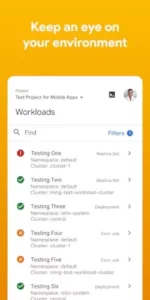
Google Cloud Practical Use Cases
Application Hosting and Web Services
Google Cloud is widely used for hosting web applications, APIs, and backend services because it allows developers to deploy scalable systems without worrying about physical infrastructure. Whether it is a simple website or a complex global platform, Google Cloud provides the tools needed to handle traffic spikes, ensure uptime, and maintain performance across different regions.
Data Storage and Backup Solutions
Organizations rely on Google Cloud to store large amounts of data securely while ensuring that backups are available in case of failure or data loss. The platform’s distributed storage systems make it possible to keep data accessible and protected, which is essential for businesses that depend on continuous data availability.
Data Analytics and Business Intelligence
Google Cloud enables companies to process and analyze massive datasets using powerful analytics tools, allowing them to extract insights, identify trends, and make data-driven decisions. This is particularly useful for industries that rely on real-time data, such as finance, e-commerce, and marketing.
Machine Learning and AI Applications
Developers and organizations use Google Cloud’s AI and machine learning services to build intelligent systems such as recommendation engines, predictive models, and automation tools. These capabilities help businesses improve efficiency, personalize user experiences, and gain a competitive advantage.
Enterprise Infrastructure and Scaling
Large enterprises use Google Cloud to manage complex systems that require high availability, global reach, and the ability to scale quickly. Instead of maintaining expensive on-premise infrastructure, companies can rely on cloud resources that expand or contract based on demand.
Google Cloud Tips and Tricks
Start Small and Scale Gradually
For beginners, it is important to start with small projects or use the free tier to understand how services work before scaling up, which helps avoid unnecessary complexity and unexpected costs.
Monitor Costs and Set Billing Alerts
Since Google Cloud uses a pay as you go model, keeping track of usage and setting billing alerts early can prevent unexpected expenses and help maintain better financial control.
Use Managed Services When Possible
Choosing managed services reduces the need for manual configuration and maintenance, allowing users to focus more on development and less on infrastructure management.
Organize Projects Clearly
Creating a clear structure for projects, resources, and permissions from the beginning helps prevent confusion and makes it easier to manage systems as they grow in complexity.
Learn Regions and Zones Strategy
Understanding how regions and zones work can significantly improve performance and reliability, as deploying services closer to users reduces latency and enhances user experience.
Focus on One Use Case First
Instead of trying to learn everything at once, focusing on a single use case such as hosting or storage helps build a solid foundation before expanding to more advanced services.
Google Cloud Similar Platforms
Amazon Web Services
Amazon Web Services, often referred to as AWS, is one of the largest cloud platforms in the world, offering a vast range of services for computing, storage, databases, and AI, making it a direct competitor to Google Cloud in enterprise environments.
Microsoft Azure
Microsoft Azure provides a strong cloud ecosystem with deep integration into Microsoft products such as Windows Server and Office, making it especially attractive for enterprises already using Microsoft technologies.
Oracle Cloud
Oracle Cloud focuses heavily on enterprise workloads and database management, offering high performance infrastructure tailored for business critical applications.
IBM Cloud
IBM Cloud combines traditional cloud services with AI and hybrid cloud solutions, targeting organizations that require advanced data processing and enterprise level security.
DigitalOcean
DigitalOcean is known for its simplicity and developer friendly approach, making it a popular choice for smaller teams and startups that want straightforward cloud hosting without the complexity of larger platforms.
Key Advantage
Despite strong competition, Google Cloud stands out for its advanced data analytics, AI capabilities, and seamless integration with other Google services, which makes it particularly appealing for data-driven applications and modern development workflows.
Google Cloud Community and Ecosystem
Professional Collaboration Environment
Google Cloud operates within a professional ecosystem where teams collaborate on shared projects, manage resources together, and coordinate deployments, making it an essential tool for modern development and IT operations.
Documentation and Learning Resources
The platform is supported by extensive official documentation, tutorials, and training materials that help users learn how to use services effectively, from beginner-level concepts to advanced architectural patterns.
Developer and IT Community
A large global community of developers, engineers, and IT professionals actively shares knowledge, best practices, and troubleshooting advice through forums, blogs, and online discussions, making it easier for users to solve problems and improve their workflows.
Integration with Google Ecosystem
Google Cloud integrates deeply with other Google services and tools, creating a unified environment where users can connect applications, data, and workflows seamlessly across multiple platforms.
Conclusion
Google Cloud is a comprehensive cloud platform that enables users to build, deploy, and scale applications efficiently while leveraging powerful infrastructure and advanced technologies.
Its main strengths include scalability, flexibility, strong data analytics capabilities, and a wide range of services that support everything from simple applications to complex enterprise systems.
In an increasingly digital world where speed, scalability, and innovation are essential, Google Cloud provides the foundation for building modern solutions while removing the traditional limitations of physical infrastructure.
FAQ (Frequently Asked Questions)
What is Google Cloud and how does it work?
Google Cloud is a cloud computing platform developed by Google LLC that allows users to build, deploy, and scale applications without managing physical servers. Instead of owning hardware, you use Google’s infrastructure through a web based console or APIs.
Is Google Cloud free to use?
Google Cloud offers a limited free tier and trial credits for new users, but most services operate on a pay-as-you-go pricing model. This means you only pay for the resources you actually use, making it flexible for both small and large projects.
Where can I access or get started with Google Cloud?
You can access the platform through its official website:https://cloud.google.com/
Or by using the Google Cloud app from the Official Play Store to manage services via the web console or mobile companion.
What resources can help me learn Google Cloud?
To better understand the platform, you can explore:
- Google Cloud Documentation → https://cloud.google.com/docs
- Google Cloud Community → https://www.googlecloudcommunity.com/
- Google Cloud Platform Wikipedia → https://en.wikipedia.org/wiki/Google_Cloud_Platform
Who should use Google Cloud?
Google Cloud is ideal for developers, startups, enterprises, and data driven teams that need scalable infrastructure, powerful computing resources, and advanced tools like AI, analytics, and global networking.