
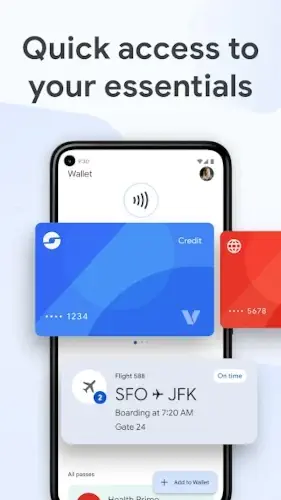
Google Wallet is positioning itself as more than just a simple payment tool.

Google Wallet aiming to replace your entire physical wallet. From cards and tickets to IDs and passes, it brings everyday essentials into one secure, accessible place on your phone.
Developed by Google LLC, Google Wallet is designed as an all in one digital solution that simplifies how users store, manage, and access important items. Whether you’re making a quick payment, boarding a flight, or scanning a loyalty card, everything is just a tap away.
The app focuses on convenience, security, and seamless integration within the broader Google ecosystem. It eliminates the need to carry multiple physical items while ensuring that sensitive data remains protected through advanced security systems.
What Is Google Wallet?
Google Wallet is a digital wallet application designed to store and manage essential items like payment cards, tickets, passes, and identification, all in one place. Instead of carrying a bulky wallet, users can rely on their smartphone for everyday transactions and access.
The core idea is simple: replace your physical wallet with a secure, digital alternative that’s faster, smarter, and easier to manage.
Supported Items Include:
-
Payment cards (credit/debit)
-
Transit passes
-
Loyalty and membership cards
-
Event tickets and boarding passes
-
Digital IDs and access keys
-
Health and vaccination passes
The app is primarily built for the Android ecosystem, where it integrates deeply with system level security and services. It also works alongside Google Pay acceptance points, allowing seamless contactless payments at supported locations worldwide.
Unlike traditional apps that require constant navigation, Google Wallet follows a utility based workflow, meaning everything is ready when you need it, whether it’s tapping to pay or quickly accessing a boarding pass.
Google Wallet Features:
Tap to Pay Technology
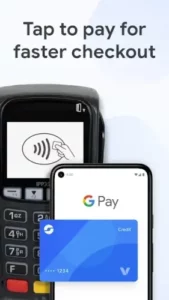
Google Wallet enables fast, contactless payments using encrypted transaction codes instead of sharing your real card details. This ensures both speed and security at supported payment terminals worldwide.
Pass & Card Storage
Users can store a wide range of digital items in one organized space. From flight tickets to loyalty cards, everything is easily accessible through a clean, card-based system designed for quick retrieval.
Security & Privacy
Security is a major focus. Google Wallet uses encrypted transactions, integrates with Android’s built-in protections (like device lock and two factor authentication), and supports remote data removal via Find My Device.
Family Controls
Through Google Family Link, parents can manage how younger users interact with the app, ensuring safe and controlled usage of digital payments and passes.
Developer & Merchant Integration
Businesses can integrate directly with Google Wallet using “Add to Google Wallet” features. This allows users to quickly save tickets, passes, or loyalty cards directly from apps or websites.
Cross Google Ecosystem Integration
The app connects seamlessly with other Google services. For example, travel confirmations from Gmail can automatically suggest adding boarding passes to your wallet, making everyday tasks more efficient.
Google Wallet Graphics, Interface & Design
Google Wallet features a clean, card based interface that prioritizes clarity and usability over flashy design elements. Each item, whether a card, ticket, or pass, is displayed in a stacked layout, making navigation intuitive and fast.
The minimalist design ensures that users can quickly locate what they need without distractions. Strong visual separation between items improves readability, while smooth transitions enhance the overall experience.
The app is optimized for speed, allowing quick scanning for payments or passes with minimal effort. Overall, the design philosophy focuses on functionality first, delivering a streamlined and efficient user experience.
Google Wallet User Reviews:
Positive Feedback
-
Users consistently praise the convenience of having everything in one place
-
Strong trust in Google’s security and ecosystem integration
-
Easy organization of cards, tickets, and passes
-
Reliable and smooth tap to pay experience
Negative Feedback
-
Limited options for interface customization
-
Occasional inconsistencies in UI behavior across devices
-
Some features are restricted depending on region or country availability
-
Frequent comparisons with competing wallet apps highlight missing niche features
Google Wallet Mechanics:
Add a Card or Pass
Users can easily add debit/credit cards, boarding passes, event tickets, loyalty cards, and more directly into Google Wallet. This is typically done by scanning, linking accounts, or entering details manually.
Verify and Authenticate
Before using any stored item, Google Wallet ensures security through authentication methods like fingerprint, face unlock, PIN, or device lock verification. This protects sensitive financial and personal data.
Use Tap to Pay or Present Pass
For payments, simply unlock your device and tap it on a compatible terminal. For passes (like tickets or boarding passes), open the app or use quick access to present the QR/barcode when needed.
Manage, Update, or Remove Stored Items
Users can organize their wallet by editing, updating expired passes, or removing items they no longer need. Some passes update automatically (e.g., flight info or event changes).
Continuous Utility Cycle (No Traditional “Gameplay”)
Unlike games, Google Wallet operates as an ongoing utility tool. Users interact with it daily, adding, using, and managing items, without levels, progression systems, or gamified mechanics.
Google Wallet Tips:
Add Payment Cards First for Quick Access
Start by adding your primary debit or credit card to enable instant contactless payments wherever supported.
Organize Passes Logically
Group travel tickets, loyalty cards, and event passes in a way that makes them easy to access during real world situations.
Enable Security Features
Activate device lock, two factor authentication (2FA), and remote erase options to protect your wallet in case your device is lost or stolen.
Use Digital Keys and IDs Where Supported
Take advantage of features like digital car keys or ID storage if available in your region for added convenience.
Check Regional Compatibility
Not all features are available worldwide, so verify support for payments, IDs, or passes in your country before relying on them.
Keep the App Updated
Regular updates ensure better security, new integrations, and smoother performance across devices.
Google Wallet Similar Apps & Alternatives
Apple Wallet
The iOS equivalent, offering similar functionality for storing cards, passes, and digital keys within the Apple ecosystem.
Samsung Wallet
Designed for Samsung devices, combining payments, digital IDs, and additional device-specific integrations.
Curve
A financial focused app that consolidates multiple cards into one and adds smart payment controls.
Revolut
A digital banking app with built-in payment tools, budgeting features, and international money management.
Stocard
Primarily focused on storing loyalty cards and retail memberships for easy scanning in stores.
Positioning
Google Wallet stands out for its deep integration with Android and Google services, offering a seamless experience rather than focusing heavily on customization or advanced financial tools.
Conclusion
Google Wallet positions itself as a practical, secure digital companion designed to simplify everyday transactions and access.
Strengths
-
Seamless convenience for payments and passes
-
Strong security and authentication systems
-
Broad support for tickets, cards, and digital items
-
Deep integration within the Google ecosystem
Limitations
-
Limited customization options
-
Feature availability varies depending on region
Ideal Users
-
Android users looking for an all in one wallet
-
Frequent travelers managing tickets and passes
-
Anyone relying on contactless payments daily
Google Wallet is a reliable, everyday tool that removes the need for physical cards and paper passes, delivering a streamlined and secure digital experience in one place.
FAQ
What is Google Wallet and how does it work?
Google Wallet is a digital payment app that lets you store debit/credit cards, transit passes, tickets, and more. You can pay in stores using your phone via NFC or manage digital items securely in one place.
Where can I download Google Wallet?
Download Google Wallet from Google Play Store
Is Google Wallet safe to use?
Yes, Google Wallet uses advanced security like tokenization, encryption, and biometric authentication (fingerprint or face unlock) to protect your data and transactions.
What can I store in Google Wallet besides cards?
You can store boarding passes, event tickets, loyalty cards, public transport passes, digital keys, and even some IDs depending on your region.
Does Google Wallet require an internet connection?
You don’t always need internet for payments. Once your card is added, NFC payments can work offline for a limited number of transactions, but syncing and updates require a connection.