
Google Maps transforming traditional navigation into a dynamic, all in one platform for travel, discovery, and decision making.

Google Maps is a powerful navigation and local discovery platform designed to help users explore the world around them while making smarter travel choices. Whether you are commuting to work, planning a road trip, or searching for a nearby restaurant, the app combines mapping technology with real time updates, user-generated content, and location based services to deliver a seamless experience.
This matters more than ever in a connected world where time, accuracy, and convenience are critical. Google Maps simplifies travel by providing precise directions, up to date traffic information, and detailed place insights, allowing users to avoid delays, discover new destinations, and navigate unfamiliar environments with confidence.
Overview of Google Maps
What is Google Maps?
Google Maps is a comprehensive navigation and mapping application developed by Google LLC that enables users to search for locations, explore places, and navigate routes using real time data and interactive maps.
Core Purpose
The primary goal of Google Maps is to help users find destinations, plan efficient routes, and explore local areas with ease. It combines mapping, navigation, and discovery tools into a single platform that supports both everyday commuting and more complex travel planning scenarios.
Who It’s For
Google Maps is designed for a wide range of users, including drivers who need accurate directions, commuters navigating daily routes, travelers exploring new cities, tourists discovering landmarks, and anyone who relies on location-based information to move through the world efficiently.
Primary Use Case
The app is primarily used for navigation, route planning, and discovering nearby places such as restaurants, shops, and services. By integrating real time data and community insights, it allows users to make informed decisions about where to go and how to get there.
Google Maps Key Features
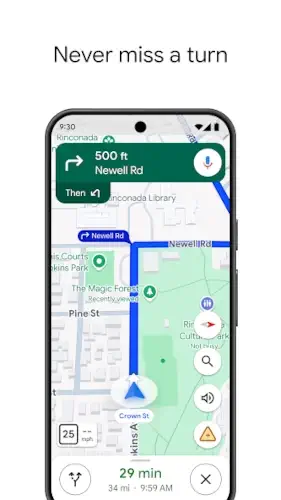
Turn byTurn Navigation
Google Maps provides detailed, step by step directions for driving, walking, biking, and public transit, ensuring users can follow clear guidance regardless of their preferred mode of transportation.
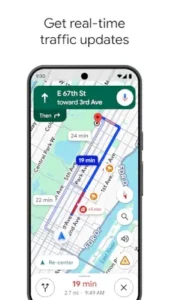
Real Time Traffic Updates
The app continuously analyzes live traffic conditions, reporting congestion, accidents, road closures, and delays so users can adjust routes and avoid unnecessary travel time.
Street View & 3D Mapping
With immersive Street View and 3D mapping, users can visually explore streets, landmarks, and neighborhoods, making it easier to understand unfamiliar areas before visiting them in person.
Indoor Maps
Google Maps extends navigation indoors by offering detailed maps for large locations such as airports, shopping malls, and event venues, helping users find specific stores, gates, or facilities.
Location Sharing
Users can share their real time location with friends or family, which is especially useful for coordinating meetups, ensuring safety during travel, or keeping others informed of arrival times.
Lens in Maps / Live View
Augmented reality features like Live View use the device camera to overlay directions and place information directly onto the real world, making navigation more intuitive in complex environments.
User Reviews & Ratings
A large community contributes reviews, ratings, photos, and videos, giving users valuable insights into businesses, attractions, and services before making decisions.
Saved Places & Lists
Users can bookmark favorite locations, create custom lists, and organize travel plans, making it easier to revisit places or plan future trips efficiently.
Offline Maps
Google Maps allows users to download maps for offline use, ensuring navigation remains available even in areas with limited or no internet connectivity.
Route Planning & ETA
The app calculates estimated travel times based on current conditions and suggests optimal routes, helping users plan journeys more effectively and arrive on time.
How Google Maps Works
Basic Workflow
The typical experience begins with searching for a location, selecting a preferred route, following navigation guidance, arriving at the destination, and optionally saving or reviewing the place for future reference.
Navigation Flow
Users enter a destination, choose their mode of transportation, and follow turn-by-turn directions that are continuously updated based on real-time conditions such as traffic or route changes.
Discovery Process
Google Maps supports exploration by allowing users to search for places, compare options, read reviews, and evaluate ratings before deciding where to go, making it a powerful tool for local discovery.
Community Contribution Loop
After visiting a location, users can contribute by leaving reviews, uploading photos, and sharing feedback, which helps improve the platform for others and keeps information accurate and up to date.
Google Maps Graphics and Design
Map Centered Interface
The design of Google Maps revolves around the map itself, which serves as the central visual element, ensuring that location data is always the primary focus of the user experience.
Navigation Layout
The interface includes a prominent search bar, quick-access categories for common searches, and layered controls that allow users to toggle features like traffic, transit, and satellite views.
Visual Language
Google Maps uses color-coded routes, pins, icons, and labels to present complex geographic and navigation data in a clear and understandable way, making it easy to interpret information at a glance.
User Experience
While the app is fast, responsive, and highly functional, it can occasionally feel dense when users navigate through multiple layers of search results or explore advanced features, especially for new users.
Google Maps User Reviews and Feedback
Positive Feedback
Users consistently praise Google Maps for its accurate navigation, reliable real time data, and extensive database of places, which together create a dependable tool for everyday use.
Popular Use Cases
The app is widely used for daily commuting, long distance travel planning, discovering new restaurants or attractions, and navigating unfamiliar cities with confidence.
Criticism
Some users note that the interface can feel complex or cluttered, particularly when managing multiple search results or navigating between different layers of information.
Overall Reputation
Despite minor usability concerns, Google Maps remains one of the most trusted and widely used navigation apps in the world, valued for its accuracy, versatility, and continuous innovation.
Google Maps Practical Use Cases
Everyday Navigation and Commuting
Google Maps plays a crucial role in daily commuting by helping users navigate efficiently between home, work, and other frequent destinations while adapting routes based on real time traffic conditions. Instead of relying on static directions, users benefit from continuously updated guidance that reflects accidents, congestion, or road closures, making daily travel more predictable and less stressful.
Travel Planning and Exploration
For travelers, Google Maps becomes a complete planning companion that goes beyond simple navigation. Users can research destinations, explore neighborhoods through Street View, check reviews, and build itineraries by saving places into custom lists. This allows for a more informed and organized travel experience, where decisions are supported by real user feedback and detailed location insights.
Local Business Discovery
The platform is widely used to discover nearby restaurants, shops, services, and attractions, offering detailed information such as opening hours, photos, ratings, and customer reviews. This makes it easier for users to compare options and choose places that match their preferences, turning Google Maps into a powerful local discovery engine rather than just a navigation tool.
Group Coordination and Location Sharing
Google Maps simplifies coordination between people by allowing real-time location sharing, which is particularly useful for meeting friends, managing group travel, or ensuring safety during trips. Instead of constant messaging, users can track each other’s location and estimated arrival times directly within the app.
Business and Delivery Operations
Businesses and delivery services rely on Google Maps for route optimization, accurate address lookup, and efficient navigation. Whether it is a small business managing local deliveries or a large logistics operation, the app helps reduce travel time and improve operational efficiency through reliable mapping and routing tools.
Google Maps Tips and Tricks
Save Frequent Locations for Faster Access
By saving home, work, and frequently visited places, users can significantly reduce the time spent entering destinations and quickly access routes with just a few taps, making everyday navigation more efficient.
Use Offline Maps When Traveling
Downloading maps in advance ensures that navigation remains available even in areas with limited or no internet connection, which is especially useful when traveling internationally or in remote regions.
Check Traffic Before You Leave
Reviewing real time traffic conditions before starting a trip allows users to avoid delays and choose the most efficient route, helping them better manage time and reduce travel frustration.
Explore with Street View Before Visiting
Using Street View to preview locations can provide valuable context about surroundings, parking options, entrances, or landmarks, which helps users feel more confident when visiting unfamiliar places.
Leverage Lists for Trip Planning
Creating and organizing lists of saved places allows users to plan trips more effectively, grouping restaurants, attractions, and stops into a structured itinerary that can be easily accessed during travel.
Enable Location Sharing for Safety
Sharing your live location with trusted contacts can improve safety during travel and simplify coordination when meeting others, particularly in busy or unfamiliar areas.
Use Filters and Reviews for Better Decisions
Taking advantage of filters, ratings, and user reviews helps users make more informed decisions about where to go, ensuring that choices are based on real experiences rather than guesswork.
Google Maps Similar Apps
Apple Maps
Apple Maps offers a similar navigation and discovery experience within the Apple ecosystem, providing clean visuals, turn-by-turn directions, and deep integration with iOS devices, making it a strong alternative for Apple users.
Waze
Waze focuses heavily on real time, community-driven traffic updates, offering detailed alerts about accidents, speed traps, and road conditions, which makes it particularly popular among drivers looking for the fastest routes.
HERE WeGo
HERE WeGo emphasizes offline navigation and route planning, making it a reliable choice for users who frequently travel in areas with limited connectivity or prefer downloading maps in advance.
Sygic
Sygic provides GPS-based navigation with offline maps and advanced features such as speed limit warnings and premium navigation tools, catering to users who want more control over their driving experience.
MapQuest
MapQuest remains a classic mapping and directions service that offers route planning, navigation, and local search, although it is less feature-rich compared to modern platforms like Google Maps.
Key Advantage
Despite strong competition, Google Maps stands out due to its combination of real time data, extensive place information, global coverage, and seamless integration with other Google services, making it one of the most comprehensive navigation tools available.
Google Maps Community and Ecosystem
Community Driven Content
Google Maps benefits from a vast global community of users who contribute reviews, ratings, photos, and updates, creating a constantly evolving database of real-world information that enhances the accuracy and usefulness of the platform.
Contribution and Feedback Loop
Users actively participate by sharing their experiences after visiting locations, which helps others make better decisions while also improving the quality of information available within the app. This continuous feedback loop ensures that listings remain relevant and up to date.
Not a Traditional Social Platform
Although it includes user-generated content, Google Maps is not designed as a social network. Its focus remains on practical value and utility rather than social interaction, with contributions serving a functional purpose rather than personal expression.
Integration Within the Google Ecosystem
The app integrates seamlessly with other Google services such as Search, Gmail, and Calendar, allowing users to access location data, reservations, and travel plans in a connected and efficient way. This ecosystem approach enhances convenience and creates a unified user experience across multiple tools.
Conclusion
Google Maps is far more than a simple mapping application, as it combines navigation, real-time data, local discovery, and community insights into a single, highly functional platform that supports everyday travel and exploration.
Its greatest strengths lie in accurate navigation, comprehensive place information, real-time traffic intelligence, and a powerful ecosystem that connects users to a wide range of services and data sources.
In a world where movement, timing, and information are closely connected, Google Maps stands out as an essential tool that not only helps users reach their destinations but also empowers them to explore, discover, and make smarter decisions wherever they go.
FAQ (Frequently Asked Questions)
What is Google Maps and how does it work?
Google Maps is a navigation and local discovery app that helps users find locations, plan routes, and explore places using real-time data such as traffic conditions, user reviews, and map updates.
Where can I find the Google Maps download?
You can get the latest Google Maps download from the official sources below:
- Official Google Play Store: https://play.google.com/store/apps/details?id=com.google.android.apps.maps
- Official Website: https://www.google.com/maps
These sources ensure you are downloading the most secure and up-to-date version of the app.
Can I use Google Maps without an internet connection?
Yes, Google Maps allows users to download offline maps for specific areas, enabling navigation and route planning even when there is no internet connection available.
How accurate is Google Maps for navigation and traffic?
Google Maps is known for its high accuracy due to real-time data, GPS tracking, and community updates, which help provide reliable directions, estimated arrival times, and traffic alerts.
Where can I learn more or get help with Google Maps?
You can explore additional resources here:
- Wikipedia: https://en.wikipedia.org/wiki/Google_Maps
- Google Maps Help Center: https://support.google.com/maps
- Community Forum: https://support.google.com/maps/community
These platforms provide guides, troubleshooting help, and discussions with other users.