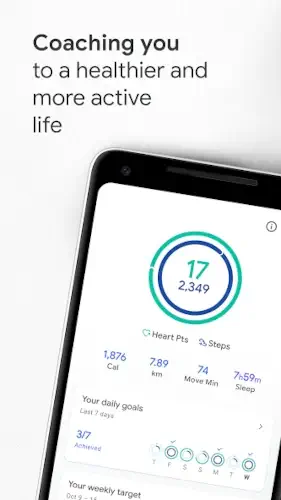
Google Fit dosen`t complicate things. Sometimes, simple is exactly what works.
Google Fit is a lightweight activity tracking app developed by Google LLC, designed to monitor your movement, workouts, and health data with minimal effort. Google Fit stands out by keeping things simple. It helps users stay active and aware of their health without overwhelming features, making it easy to build consistent habits.
Overview of Google Fit
What is Google Fit?
Google Fit is a fitness and activity tracking app by Google LLC that focuses on monitoring everyday movement and health metrics.
Core Purpose
Its main goal is to track daily activity, workouts, and essential health data in a simple, user-friendly way.
Who It’s For
Ideal for casual users, beginners, and anyone who wants basic fitness tracking without complicated tools or steep learning curves.
Primary Use Case
Monitoring steps, movement, and overall activity levels throughout the day to encourage a more active lifestyle.
Google Fit Key Features
Automatic Activity Detection
Tracks walking, running, biking, and other movements automatically without requiring manual input.
Activity Metrics Tracking
Measures key data such as steps, calories burned, distance, and elevation.
Move Minutes & Heart Points
Encourages healthier habits using simple, goal-based metrics that reward consistent activity.
Workout Logging
Allows users to manually log activities like pilates, cycling, and other workouts.
Device Integration
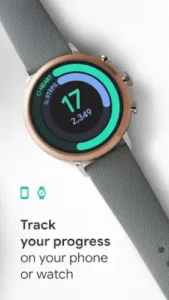
Works seamlessly with smartphones and Wear OS devices for improved tracking accuracy.
Health Data Aggregation
Syncs with other apps and services to provide a more complete view of your health data.
Guided Workouts
Offers paced walking sessions to help users stay consistent and motivated.
Progress Tracking
Displays activity history and trends over time, helping users monitor improvement.
How Google Fit Works
Basic Workflow
Move → track → review → improve.
Tracking Loop
Automatic detection logs activity → data is analyzed → goals are updated.
User Interaction
Requires minimal input, with most tracking happening automatically in the background.
Motivation System
Heart Points and Move Minutes provide light gamification, encouraging users to stay active without pressure.
Google Fit Graphics and Design
Material Design Style
Clean interface with a white background and rounded UI elements for a modern look.
Data Visualization
Uses simple charts and cards to make activity metrics easy to understand at a glance.
Minimal Layout
Focuses on clarity and usability rather than flashy visuals or cluttered screens.
Cross Device Experience
Maintains a consistent design across smartphones and Wear OS devices for a seamless experience.
Google Fit User Reviews and Feedback
Positive Feedback
Users appreciate its simplicity, automatic tracking, and smooth integration with the Google ecosystem.
Popular Use Cases
Widely used for daily activity tracking, step counting, and basic fitness monitoring.
Criticism
Some users feel it lacks advanced coaching features, detailed analytics, and structured workout plans.
Overall Reputation
Considered a reliable, beginner friendly fitness app that prioritizes simplicity and ease of use over complexity.
Google Fit Practical Use Cases
Daily Activity Tracking
Track steps, calories burned, and movement automatically throughout the day, helping users stay aware of their activity without manual input.
Fitness Awareness
Understand overall health trends by reviewing daily, weekly, and long-term activity data in a simple, visual format.
Workout Monitoring
Record and analyze activities like walking, running, cycling, or gym workouts to keep track of progress and consistency.
Health Data Hub
Combine and sync data from multiple fitness apps and devices, creating a centralized view of your health and activity.
Google Fit Tips and Tricks
- Set realistic activity goals to stay motivated and consistent.
- Enable automatic activity detection for effortless tracking.
- Use a Wear OS device for improved accuracy and continuous monitoring.
- Check Heart Points and Move Minutes regularly to track progress.
- Log workouts manually when needed for better accuracy.
- Sync with other health platforms for a more complete data overview.
- Try guided walking workouts for a simple, structured fitness boost.
Google Fit Similar Apps
Fitbit
A comprehensive fitness tracking platform offering detailed analytics, sleep tracking, and guided health programs.
Samsung Health
An all in one health app that tracks activity, nutrition, sleep, and wellness metrics across Samsung devices.
Apple Health
A centralized health data hub for iOS users, combining activity tracking, medical data, and third-party integrations.
Strava
A performance focused fitness app popular among runners and cyclists, with strong tracking and social motivation features.
MyFitnessPal
A health and nutrition app that combines calorie tracking with fitness data for a more complete wellness approach.
Key Advantage
Google Fit stands out for its simplicity, automatic tracking, and seamless integration within the Google ecosystem, making it ideal for users who want a no friction experience.
Google Fit Community and Ecosystem
Not a Social First App
Google Fit focuses on personal health tracking rather than competition or social sharing.
Support Community
Users can access guidance through Google help resources, tutorials, and official documentation.
User Discussions
Active conversations on forums and communities help users troubleshoot issues and improve tracking accuracy.
Ecosystem Integration
Works smoothly with Wear OS, Android devices, and connected health platforms, making it part of a broader digital health ecosystem.
Conclusion
Google Fit is a simple yet effective fitness tracking solution designed for everyday users.
Core Strengths
Ease of use, automatic tracking, and seamless integration across devices.
A lightweight, no-pressure approach to fitness that helps users stay active, informed, and consistent, without overcomplicating their routine.
FAQ (Frequently Asked Questions)
What is Google Fit and how does it work?
Google Fit is a simple activity tracking app that automatically records your movement, tracks workouts, and helps you stay active using metrics like Heart Points and Move Minutes.
Is Google Fit free to use?
Yes, Google Fit is completely free and available for Android devices and Wear OS smartwatches, with no subscription required.
Where can I get Google Fit download?
You can access the Google Fit download here:
- Google Play Store: https://play.google.com/store/apps/details?id=com.google.android.apps.fitness
- Official Page: https://www.google.com/fit/
- Community Discussions: https://www.reddit.com/r/GoogleFit/
Does Google Fit work with other apps and devices?
Yes, Google Fit can sync with various health apps, fitness trackers, and Wear OS devices to provide a more complete overview of your health data.
Is Google Fit accurate for tracking activity?
For basic tracking like steps and movement, Google Fit is generally accurate, especially when paired with a smartwatch, but it may be less detailed than advanced fitness platforms.