Gmail started as a straightforward email service has grown into a central workspace where messages, files, meetings, and tasks come together in a single, unified environment.
Gmail is a cloud based email platform developed by Google LLC, designed not only for sending and receiving messages but also for managing communication in a smarter and more efficient way. By integrating tools like Calendar, Drive, Docs, Meet, and Chat directly into the interface, Gmail transforms the inbox into a dynamic control center where users can plan, collaborate, and execute tasks without constantly switching between apps.
This matters because modern communication is no longer just about exchanging emails; it is about managing information flow, reducing distractions, and staying organized in a digital environment. Gmail helps users reduce inbox clutter through automation, improve response speed with AI-assisted tools, and stay connected to a broader ecosystem that enhances both personal productivity and professional collaboration.
Overview of Gmail
What is Gmail?
Gmail is a cloud-based email service developed by Google LLC that allows users to send, receive, organize, and search emails from virtually any device with an internet connection. Unlike traditional email clients that rely heavily on local storage and manual organization, Gmail operates in the cloud, making it faster, more flexible, and accessible across platforms.
Core Purpose
The core purpose of Gmail is to manage email communication while simultaneously organizing, searching, and automating inbox workflows in a way that reduces friction and saves time. It is built to handle everything from a few daily messages to thousands of emails, using intelligent systems that keep communication structured and easy to navigate.
Who It’s For
Gmail is designed for a broad audience that includes individuals managing personal communication, professionals handling work correspondence, businesses coordinating teams, students organizing academic tasks, and collaborative groups that rely on efficient communication tools to stay aligned.
Primary Use Case ( we return to this with more detail)
The primary use case of Gmail revolves around sending, receiving, organizing, and searching emails while seamlessly integrating with productivity tools that enable collaboration, scheduling, and file sharing within a single ecosystem.
How Gmail Works
Basic Workflow
The basic workflow in Gmail follows a structured process where users receive incoming emails, organize them using labels or filters, respond when necessary, and then archive or manage messages to maintain a clean and efficient inbox.
Productivity Loop
Gmail’s productivity loop revolves around capturing incoming messages, categorizing them intelligently, responding efficiently using built-in tools, and automating repetitive tasks to streamline communication over time.
Automation Elements
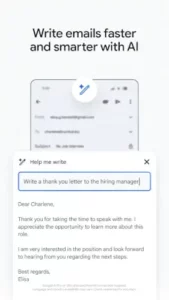
Automation plays a significant role in Gmail through the use of filters, labels, AI-generated suggestions, and templates, all of which reduce manual effort and allow users to focus on more meaningful interactions.
Integration Flow
Emails within Gmail are closely connected to other Google services, enabling users to turn messages into Calendar events, attach files from Drive, or initiate Meet sessions, creating a seamless flow between communication and action.
Gmail Graphics and Design
Interface Style
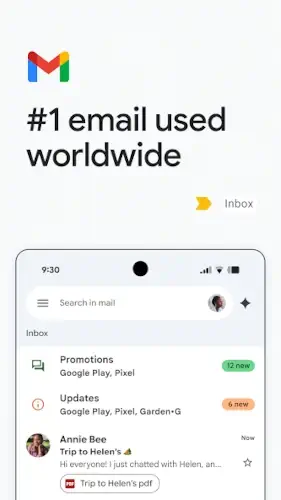
Gmail features a clean and modern interface that prioritizes readability and efficiency, ensuring that users can quickly scan, read, and respond to messages without unnecessary visual distractions.
Navigation Structure
The layout includes a left hand sidebar for folders and labels, a central inbox view for emails, and a top search bar that provides quick access to specific messages and features.
Workspace Layout
An integrated panel allows users to access Chat, Meet, and Spaces directly within Gmail, enabling communication and collaboration without switching between multiple applications.
Design Philosophy
Gmail’s design philosophy focuses on balancing simplicity with functionality, ensuring that both casual users and advanced users can navigate the platform effectively while still benefiting from its full range of features.